Invite People to your space or room
We appreciate your feedback on our new Helmholtz Matrix Service and this Documentation!
- Please contact us if you encounter any errors.
- Helmholtz members are also invited to give us some structured feedback here.
If you know the correct Matrix ID of the user(s), or the person is already part of any room or space shared with you
- click i on the header
- click invite
- enter name or matrix id in search
- for matrix id, don’t forget the @ at the beginning, e.g.
@name-xxxxx:helmholtz.cloud
- for matrix id, don’t forget the @ at the beginning, e.g.
- click invite
- the person is invited and can enter the room
If you do NOT know the Matrix ID of your users
You can alternatively distribute the access information to your space/room to your users and let them join. This is especially helpful if you don’t know their Matrix ID in the first place.
Why can’t I find a colleague in search?
Users only show up in search if you already share a room or if they are a member of a public room - simply being registered on the server is not enough. See the FAQ for details.
Make sure that you created and set up your space/room as described here and set it to at least Ask to join or Anyone, depending on your needs.
Then:
- Go to the room
- Click i on the header
-
Set an appropriate room link under “Settings”/”General”/”Local Addresses”, e.g.
# myteamroom-VLaZIAaKN:helmholtz.cloud, if you have not already done so.- Save.
- This space/room can now be identified (and possibly entered depending on allowance) via the the just defined string (and the original static (!) internal room ID)
-
Copy this identifier of the room to your clipboard. It can later also be found on the information page (i) of that room:
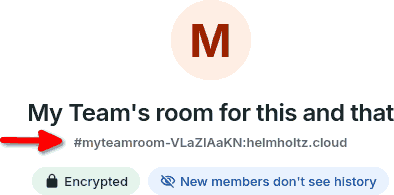
- Send this room link to your users (e.g via mail), they should
- Open their favorite matrix client with their matrix account
- Search for this room
- Enter or Ask to join
- If needed, manage requests of people who shall join the room
- click i on the header
- click Settings
- click People
Inviting a large number of defined users without individual approval
The following is an experimental workflow and has not been thoroughly tested so far. Handle with care.
In case you want to let in a large number of defined users (e.g. from a whole center or department) to either a space incl. related rooms or a specific room, but do not want to:
- individually invite every single user via Matrix ID, nor
- individually approve every single “Ask to join” request, nor
- make the room completely public to allow undefined users to join:
There is an experimental workflow for admins:
- Set the space/room in Security & Privacy settings to Anyone
- Do not “Publish this space/room in helmholtz.cloud’s room directoy”!
- Set a sufficiently long random String as “Local Addresses”, e.g.
# ajqd1i1dEdnQP1j:helmholtz.cloud. - Save.
Be aware:
- Users knowing this string/URL can join without further request or approval. This also applies to the original static (!) internal room ID.
- It should not be possible to find or enter the space/room via room search, except if the user
- knows any of the defined Local Addresses (or static internal room ID) in the first place, and/or
- is a member of any of the associated space(s) of the room.
We are thankful for feedback.
-
Copy the URL of the space/room which now contains the just-defined string and share it to your desired group (e.g. via intranet), telling users to join this room via this URL until a defined deadline.
-
After the deadline, you can set the space/room to Invite only again, and / or delete the local address with the random string.
- You can repeat the procedure with a new random string anytime later.
More Information
- How to create spaces
- How to create rooms
- How to how to enter spaces and rooms
- Step-by-step introduction is provided here: Matrix at TU Dresden / Matrix an der TU Dresden